
In this guide

GitHub
Create issues, read repositories, work with pull requests, and manage gists from Apple Shortcuts.
What you can do #
Use GitHub to capture an idea as an issue, read an issue’s current state, or get details about a repository. A repository is the project that owns the code and issues. An owner is its GitHub user or organization.
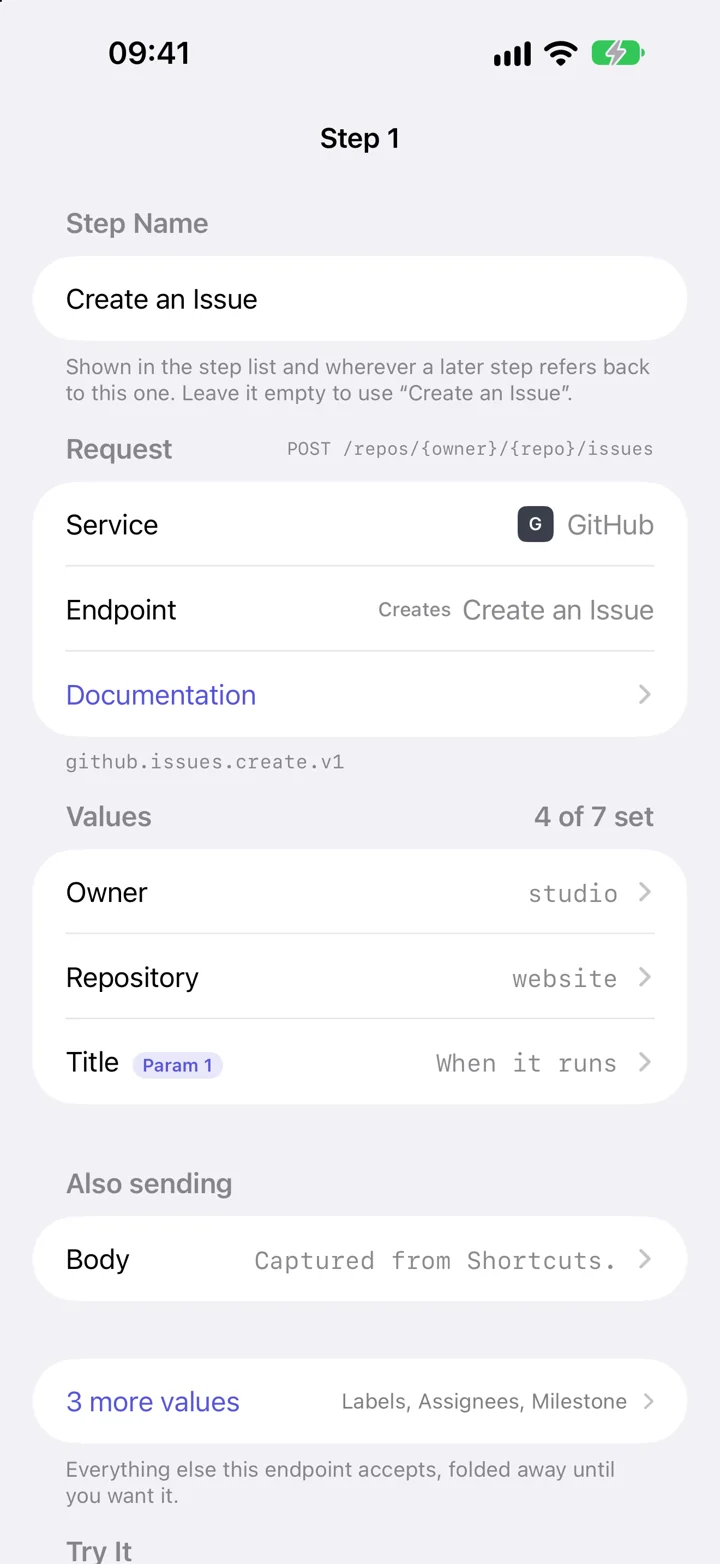
GitHub uses Shortcutify’s standard editor. You choose an action, then open each named input to fill it in. This guide starts with creating an issue; the action list below covers the other supported operations.
Connect GitHub #
- Open GitHub’s fine-grained personal access token settings and create a token.
- Choose the repository owner and repositories it should reach. Grant the permissions needed by your action. Creating an issue needs Issues: write; reading issues needs read access.
- Create and copy the token. In Shortcutify, open Services → GitHub, paste it into Paste your token, and tap Connect GitHub.
A token is a credential the app uses on your behalf. GitHub’s repository, organization, expiration, and approval rules still apply. Each action reference below lists the permissions declared by Shortcutify. GitHub’s token guide explains the permission settings.
Example: save a quick note as an issue #
- In Actions, tap +, choose GitHub, then Create an Issue.
- Fill in Owner with the GitHub user or organization, and Repository with the repository’s name. Keep both saved as text.
- Open Title, choose Shortcuts as its source, and select Param 1. The optional Body input can hold a longer note.
- Name and save the action. In Apple Shortcuts, add Execute Action, choose it, and pass your note’s title through Param 1.
To use the new issue’s link in the next Shortcuts step, open Returned Value in the action editor and select the response’s html_url field.
Running this action creates a real GitHub issue. It is useful to test it in a repository where you can keep or close the example issue.
If something does not work #
GitHub returns 404 for my repository
Check the Owner and Repository inputs, then confirm the token includes that repository and the needed permissions. A 404 can mean the token cannot access the repository, even when it exists.
Which permission do I need?
Issue actions use Issues permissions; pull-request actions use Pull requests; branch deletion uses Contents. Gists are under account permissions. The action’s reference names its requirement.
Why does the issue title change but the repository stay the same?
The repository is saved as text in Shortcutify. Title is bound to a Shortcuts slot, so your shortcut supplies it each time it runs.
All GitHub actions #
These are the actions available in the app’s request picker. Open one for its inputs, returned fields, and permissions.
Get Authenticated User
The profile the token belongs to.
List Artifact Attestations
Attestations for a given artifact digest in a repository.
List My Repositories
Every repository the token can see, newest activity first if you ask for it.
Get a Repository
Everything about one repository: stars, language, default branch, licence.
Search Public Repositories
Find repositories by name, language, stars or topic.
List Branches
Every branch in a repository.
List Repository Issues
Open issues in a repository.
List My Issues
Issues assigned to you across every repository the token can see.
Get an Issue
One issue by number, with its labels, assignees and state.
Create an Issue
Open a new issue.
Update an Issue
Edit, close, reopen, relabel or reassign an issue.
Lock an Issue
Stop anyone but collaborators commenting.
Unlock an Issue
Allow comments again.
List Labels
The labels an issue in this repository can carry.
List Assignees
Everyone an issue in this repository can be assigned to.
List Milestones
A repository's milestones, soonest due first.
List Comments in a Repository
Recent comments across every issue and pull request.
List Comments on an Issue
The conversation under one issue or pull request.
Get an Issue Comment
One comment by its id.
Comment on an Issue
Add a comment to an issue or pull request.
Edit an Issue Comment
Replace the text of a comment you can edit.
Delete an Issue Comment
Remove a comment for good.
List Pull Requests
Open pull requests in a repository.
Get a Pull Request
One pull request, including whether it can be merged.
Create a Pull Request
Open a pull request from one branch into another.
Update a Pull Request
Edit the title or description, close it, or reopen it.
Merge a Pull Request
Merge, squash or rebase a pull request.
Review a Pull Request
Approve, request changes, or leave a review comment.
Delete a Branch
Remove a branch — the clean-up step after a merge.
List My Gists
Your gists, most recently updated first.
Get a Gist
One gist, with the text of its files.
Create a Gist
Save text to a gist and get a link back.
Update a Gist
Change a gist's description, or edit, rename, add and remove its files.
Delete a Gist
Remove a gist and every revision of it.
List Comments on a Gist
The conversation under one gist.
Comment on a Gist
Add a comment to a gist.
Edit a Gist Comment
Replace the text of a comment you left.
Delete a Gist Comment
Remove a comment from a gist.
Service setup references #
The service controls its account requirements and permissions. These references explain its setup in more detail.