
In this guide

Spotify
Search for music, read your library, and configure playback actions to run from your shortcuts.
What you can do #
Spotify actions can search for tracks and albums, read playlists, get the currently playing track, and control playback. You configure named inputs in the standard action editor. For fields with a lookup, you can choose an item by name instead of typing its identifier.
Connection uses a Spotify developer app you create. Its Client ID identifies that app. You then sign in to Spotify and approve the requested access. You do not paste your Spotify password into Shortcutify.
Connect Spotify #
Spotify currently requires the owner of a developer-mode app to have Premium. A new app starts in this mode and can authorize up to five users on its allowlist. In the developer dashboard, open your app’s Settings → Users Management to add the Spotify account you will sign in with. Spotify’s current development-mode rules explain these requirements.
- Create an app in the Spotify developer dashboard. Register the redirect address shown below exactly.
- Copy the app’s Client ID. In Shortcutify, open Services → Spotify and paste it into Client ID. No client secret is needed.
- Tap Connect Spotify. Complete Spotify’s sign-in and approval screen, then return to Shortcutify.
The redirect address tells Spotify where to send the sign-in result. Use the exact address shown; a different path will not match. Spotify’s developer-mode account rules and playback requirements still apply. See Spotify’s setup guide and developer-mode rules.
https://auth.getshortcutify.app/oauth/spotifyExample: search for an album #
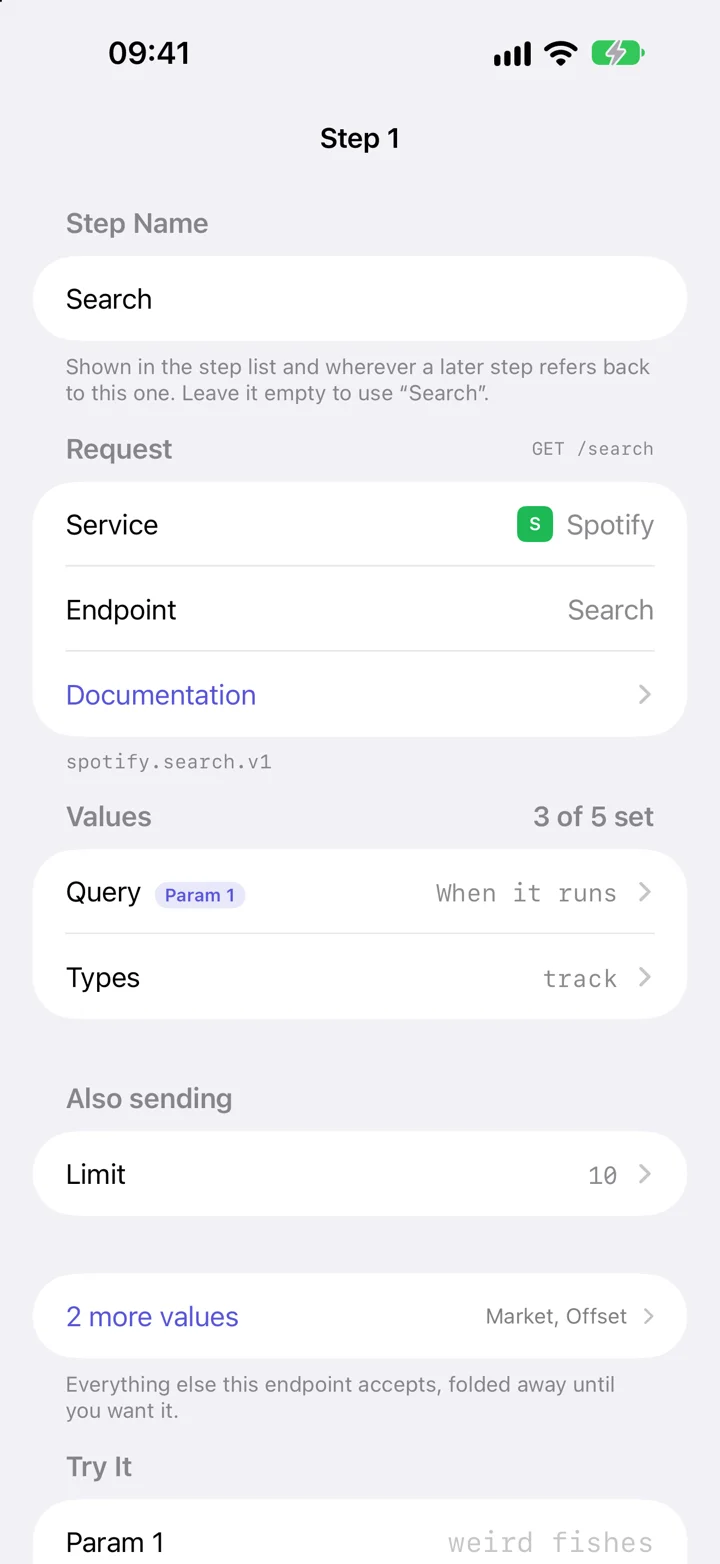
- In Actions, tap +, choose Spotify, then Search.
- Open Query and enter the words to search for. Open Types and enter album to search for albums.
- For a reusable search, change Query’s source to Shortcuts and select Param 1.
- Name and save the action. In Apple Shortcuts, add Execute Action, select it, and supply the search text through Param 1.
Open Returned Value if you want to select fields such as album names from the results. The full response remains available as a JSON File, a structured file containing the service’s answer.
If something does not work #
Spotify rejects the redirect address
Copy it exactly from the Services screen, including https and the /oauth/spotify path, and register the same address in your Spotify developer app.
Playback is not starting
Playback-control endpoints require Spotify Premium and an available device. Open Spotify on the device you want to use. Get Available Devices can show the devices Spotify currently exposes.
An action returns no currently playing track
There may be no active track. The currently-playing endpoint can answer with no content when nothing is playing.
Spotify refuses a request after sign-in
Check your developer app’s allowed users, granted permissions, and current Spotify API restrictions. A connection does not guarantee every operation is available to every account.
All Spotify actions #
These are the actions available in the app’s request picker. Open one for its inputs, returned fields, and permissions.
Get Album
Catalog information for a single album.
Get Currently Playing Track
What the user is listening to right now.
Get My Playlists
Playlists owned or followed by the user.
Get Artist's Albums
Albums, singles and compilations an artist appears on.
Search
Find tracks, albums, artists, playlists, shows or episodes by name.
Get Playback State
Everything about the current session: track, device, volume, shuffle, repeat.
Get Available Devices
The phones, computers and speakers Spotify can play on right now.
Start or Resume Playback
Play an album, playlist or list of tracks — or resume what was paused.
Pause Playback
Pause whatever is playing.
Skip to Next Track
Skip forward.
Add to Queue
Put a track or episode next in line without interrupting what is playing.
Set Volume
Set playback volume as a percentage.
Get My Saved Tracks
Liked Songs, newest first.
Save Tracks
Add tracks to Liked Songs.
Add Items to Playlist
Append tracks or episodes to a playlist.
Service setup references #
The service controls its account requirements and permissions. These references explain its setup in more detail.